


Nurse.com
4.225.00 Reviews
App Specs
- Version
- 3.3.10
- Updated On
- License
- Free
- Downloads
- 10,000+
- Developer
- Relias Mobile
- Categories
- Medical
- Platform
- Android
Screenshots
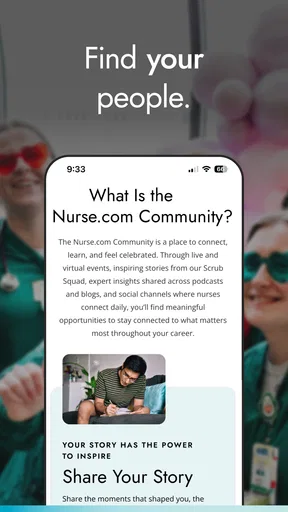
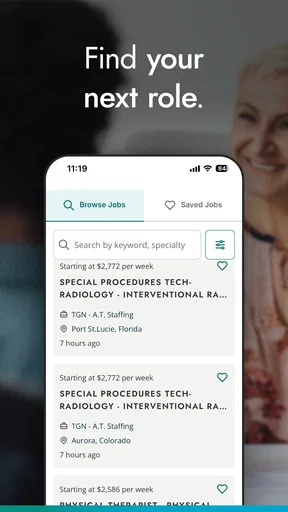
 Analysis by AppCompare
Working in nursing often means learning in the gaps between a shift, a commute, and the next urgent task. I approached Nurse.com with that reality in mind rather than treating it like a general medical reference app. Developed by Relias Mobile, this free medical app is aimed at nurses who want professional learning and career-oriented material in a format that is easier to reach from a phone. Its store summary, “Where Nurses Thrive,” points to that purpose, while the short description simply identifies it as Nurse.com.
My overall impression is that Nurse.com makes the most sense as a companion for continuing education and professional development, not as a replacement for a hospital’s clinical systems, a drug reference, or advice from a qualified clinician. That distinction matters. The app can help me keep learning when I have a few spare minutes, but it is not the tool I would open to make a time-critical patient-care decision.
The app has been available since January 30, 2018, and its current version is 3.3.10. It supports Android 7.0 and later, which gives it a reasonably broad compatibility range for people using older phones. On the store, it holds a 4.2 average from around one hundred ratings and has passed ten thousand installs. Those figures suggest a modest but established presence rather than a universal nursing platform, and they fit my sense of it: useful for the right audience, but not an essential download for every healthcare worker.
How Nurse.com fits into a nurse’s routine today
I find Nurse.com easiest to judge by looking at how it might fit around a nurse’s existing responsibilities, rather than expecting it to replace workplace training or clinical references. Its value depends on keeping professional learning separate from patient-care decisions and choosing a realistic time to use it. That practical boundary becomes especially important when a phone is shared or nearby colleagues and family members may see its contents.
A learning companion rather than a bedside reference
The strongest way to use Nurse.com is to give it a defined role. I would use it when I want to browse professional material, refresh knowledge, or make progress on education during small windows of time. I would not rely on it for dosage calculations, local protocols, emergency triage, or patient-specific decisions. Those jobs belong to approved clinical references and workplace guidance.
This separation also helps explain why the app may feel more valuable to one nurse than another. A student, newly qualified nurse, or professional planning a change in specialty may appreciate having career and learning content gathered under one recognizable service. Someone who already has a comprehensive employer-provided learning portal may find less reason to open it regularly.
The app’s medical category can create an expectation that every screen will be clinically practical. In reality, its value is broader and more professional-development focused. I found it more helpful for building a habit of learning than for answering a single narrowly defined clinical question. That is a useful strength, but only if I approach it with the right expectations.
Worth Reading Before You Choose

EA SPORTS FC Mobile 26 Is a Bigger Football Game, but It Takes Time

Flipboard Shows What News Apps Must Do Beyond the Feed

Switching to Android Auto Means Rethinking Your Driving Routine

Google Calendar Makes a Crowded Week Easier to Manage

Ludo King Makes the Most of the Minutes Between Plans

Baby Panda World Brings Quick Play to Modern Phones, but Its Game Library Feels Busy
Who is likely to benefit most
Nurse.com is a sensible choice for nurses who want a mobile way to stay connected with nursing education and career material. It may also suit people returning to practice who want a structured place to begin reviewing topics, as well as nurses comparing possible directions before committing to a course or specialty.
It is less convincing for a user who wants a fully offline textbook, a dedicated medication database, or a simple checklist app for shifts. It is also not the best fit for someone who expects every useful resource to be free. The app itself is free to install, but in-app purchases range from twenty-nine cents to one hundred forty-nine dollars and ninety-nine cents per item. That makes it important to distinguish access to the app from access to every piece of learning content that may appear within it.
For a student, I would treat it as a supplementary resource beside formal teaching, assigned reading, and institution-approved material. For an experienced nurse, I would judge it by whether its available content matches current goals rather than by the number of sections visible on the first launch.
A realistic everyday scenario
Imagine finishing a long evening shift and having fifteen quiet minutes before bed. I might open Nurse.com, choose a topic connected to a recurring area of practice, and read or work through material while the details of the shift are still fresh. I would make a note of one question to investigate later, then close the app rather than trying to turn a tired late-night session into a major study block.
That small workflow is where a mobile learning app can beat a desktop website. The phone is already nearby, and the session can be short. The trade-off is that a small screen and interruptions are not ideal for deep study. I would use the app for regular contact with learning, then move to a larger screen or a formal course environment when I need concentration, note-taking, or a longer assessment.
What the current version suggests
The presence of version 3.3.10 indicates that the product has continued beyond its initial release rather than remaining a one-off publication. That is encouraging for basic maintenance and ongoing use, especially for an app intended to support a professional audience. Still, a version number alone does not tell me that every part of the experience has been redesigned recently, so I would avoid assuming that the interface or content model is cutting edge.
For existing users, the practical question is not whether the number looks high. It is whether the current build opens reliably on their phone, preserves their learning progress, and makes it easy to return to the material they care about. Those are the changes that affect a working nurse more than a cosmetic refresh. I would update through the normal app-store process and then check my account and saved activity before beginning an important course session.
How it compares with familiar alternatives
The usual alternatives fall into several groups, and Nurse.com occupies only one of them. A hospital learning portal is usually better for mandatory workplace training because it is tied to the employer’s requirements. A reference app is better when I need a fast clinical lookup. A browser is better when I want to compare many independent sources. A full online course platform is often better for a long, structured qualification.
Where Nurse.com can be more convenient is in combining professional nursing context with a phone-friendly experience. I do not have to begin with a broad web search and then decide whether a result is relevant to nursing. The limitation is that a focused app can also feel narrower than the open web, and paid learning items may make a free installation less useful than expected for someone on a tight budget.
I would therefore compare it with the tool I already use, not with an imaginary all-in-one solution. If my employer supplies excellent education and my reference app handles clinical questions, Nurse.com becomes an optional enrichment tool. If I lack a convenient way to browse nursing-focused development material, it becomes more attractive.
Small workflow choices that improve the experience
One useful habit is to decide what I am trying to accomplish before opening the app. “Learn something about my current specialty” is more workable than scrolling without a purpose. I would set a short session goal, such as reviewing one topic or identifying one course worth returning to. This reduces the chance of spending limited break time browsing without retaining anything.
A second tip is to separate discovery from completion. I might use a short phone session to find material that fits my needs, then reserve a quieter period for completing it. This is especially helpful when a learning item involves more concentration than the screen or the surrounding environment allows. It also prevents me from judging the app unfairly because I tried to use it in an unsuitable setting.
A third trade-off concerns purchases. Since individual in-app items can vary dramatically in cost, I would inspect what is included before committing. A free download does not automatically mean that the entire learning library is free. I would also check whether a course serves a real professional goal, such as a knowledge gap or planned career move, instead of buying simply because the topic sounds interesting.
Where the app still creates friction
The clearest limitation is the distance between being free to install and being fully useful without spending money. The in-app purchase range makes the app accessible for trying, but it also means the most relevant content may not fit every user’s budget. For a nurse who needs employer-funded or accredited education under a specific policy, the app should be evaluated alongside those requirements rather than treated as an automatic substitute.
Another limitation is attention. A phone is convenient, but it is also full of interruptions. Notifications, fatigue, and the pressure of a shift can make serious learning difficult. Nurse.com can support a study habit, yet it cannot create time or concentration. I found it more realistic to use it in short, intentional sessions than to expect it to replace a planned study environment.
There is also a risk of confusing professional education with clinical authority. Even useful nursing content should be checked against local procedures, current institutional guidance, and the patient’s circumstances. I would never use a general app as the final word when a patient is in front of me. That is not a flaw unique to this product, but it is an important boundary for a medical app.
Privacy, account expectations, and practical preparation
Before using any professional learning app, I would think about the kind of information I enter. I would avoid putting patient-identifying details into notes, searches, or messages, even when I am using the app for study. A safe workflow is to describe a learning question in general terms and keep patient documentation inside approved clinical systems.
I would also prepare for the possibility that a learning session may require an account or a stable connection, depending on the part of the service I am using. Rather than starting an important activity during a short break, I would sign in beforehand and test the route to the material. That simple preparation matters more than it sounds when a nurse has only a few minutes available.
The Teen content rating is another reminder that this is professional educational software with material intended for a mature audience, not a children’s learning game. It does not turn the app into a clinical authority, but it does fit the seriousness of the subject matter. I would still use judgment about where and when I open sensitive professional content, particularly on a shared device.
What existing users should expect from its evolution
For someone who has used the app since an earlier release, the current version should be viewed as a maintained stage in the product’s development, not proof that every old frustration has disappeared. The most meaningful improvements would be practical: smoother return to unfinished learning, clearer separation between free and paid material, and dependable access during short sessions.
New users should not assume that an established app will match the workflow of their employer. I would spend the first session learning how the content is organized and deciding whether it complements my existing tools. If it does, the app can become a useful secondary resource. If it duplicates mandatory training without adding convenience, uninstalling it would be a reasonable choice.
What I would watch before making it a regular tool
I would watch how consistently new or updated material appears, how clearly purchase requirements are explained, and whether the app remains comfortable on older supported devices. Support for Android 7.0 and later is helpful for compatibility, but older hardware can still affect loading, readability, and multitasking. A nurse using an aging phone should test the experience before planning an important course around it.
I would also pay attention to whether the app helps me return to a purposeful learning path. A large library is less valuable than a clear route from choosing a topic to finishing it and remembering what I learned. If the app makes that process easy, it earns a place in my routine. If it mainly encourages browsing, a browser or a more structured course platform may be better.
My recommendation for different kinds of users
I would recommend Nurse.com to nurses who want an accessible starting point for professional learning and who are comfortable treating it as a supplement. It is especially worth trying when mobile access is more realistic than sitting at a computer, or when career development is the goal rather than immediate clinical lookup.
I would be more cautious for anyone seeking a completely free education library, a guaranteed employer-approved training route, or a comprehensive bedside reference. Those users should compare the app with their institution’s system and with specialist reference tools before depending on it. The free installation lowers the barrier to testing it, but the possible purchase costs and the need for independent clinical judgment remain important considerations.
After using it, I see Nurse.com as a practical professional companion with a clear audience and a few boundaries that should not be ignored. Relias Mobile has built an app that can fit into the fragmented schedule of nursing, and its established release history gives it a credible place among mobile learning options. My advice is to begin with one concrete goal, check which content is included before paying, and keep all patient-care decisions anchored to approved clinical resources.
My final view is that Nurse.com is most valuable when I use it deliberately: as a convenient way to keep learning, not as a shortcut around formal education or clinical judgment. Its 4.2 average and ten-thousand-plus installs show that it has found a real audience, but the right choice still depends on what I need from a nursing app. For focused professional growth, it is worth exploring; for urgent reference work or fully structured training, another tool may serve me better.
Pros
- Covers nursing careers
- education
- and clinical topics in one app.
- Useful job-search tools for nurses seeking new opportunities.
- Includes content from a recognized nursing-focused platform.
- Can support ongoing professional development between formal courses.
- Helpful for comparing nursing resources and career information on the go.
Cons
- Some features or courses may require a paid subscription.
- Content can feel more relevant to U.S.-based nurses than others.
- The app may send frequent promotional or career-related notifications.
- Certain resources may redirect users to web pages instead of staying in-app.
- Job listings and features may vary depending on location.
FAQs for Nurse.com
What is Nurse.com and who is it designed for?
Nurse.com is an educational and professional resource platform created primarily for nurses and nursing students. It typically provides continuing education courses, clinical information, career guidance, certification preparation resources, and industry news. The app or mobile experience may be useful for registered nurses, licensed practical or vocational nurses, nursing students, educators, and healthcare professionals who want to maintain their knowledge or plan their next career step.
Can I earn continuing education credits through Nurse.com?
Nurse.com offers continuing education content, but the exact availability, credit requirements, eligible courses, and approval details can vary by course and region. Before enrolling, users should check whether a specific activity provides contact hours, whether it is accepted by their licensing board or employer, and whether completion requires a quiz, evaluation, or certificate. Always confirm local renewal rules before relying on a course for license maintenance.
Is Nurse.com free to use, or does it require a subscription?
Nurse.com may include a combination of free articles, career resources, limited learning materials, and premium content that requires payment or a subscription. Pricing, trial offers, included courses, and access levels can change over time, so users should review the current plan information before downloading or subscribing. Pay particular attention to automatic renewal terms and cancellation instructions if a free trial is offered.
Does Nurse.com provide reliable clinical and nursing information?
Nurse.com is intended to support professional education and nursing practice with articles, courses, and resources developed for healthcare audiences. However, it should be used as an educational reference rather than a replacement for institutional policies, current clinical guidelines, instructor advice, or a qualified healthcare professional’s judgment. Users should verify time-sensitive recommendations and confirm that information applies to their country, specialty, and scope of practice.
What devices and account features are supported by Nurse.com?
Nurse.com is generally designed for use on mobile devices and may also be accessible through a web browser, depending on the specific service or app version available in your region. An account may be needed to save progress, access purchased courses, track completed education, or download certificates. Stable internet access is recommended for videos and course materials, while offline availability may differ between content types and platforms.


